TSAA-SF Annual Conference
Friday, July 31st, 2026
Golden Gate University, San Francisco, CA
Register for the Annual Conference here!
Reserve a discounted room at the Marriott Marquis for the Annual Conference!
Join us July 31st, 2026 in San Francisco at Golden Gate University for the TSAA-SF Annual Conference!
The TSAA-SF Annual Conference will provide members with opportunities to learn from industry professionals and network with fellow members, finance professionals, and technical analysis practitioners.


TSAA-SF June Monthly Virtual Gathering
June 2, 2026 (Tue) at 5:00 PM PT
Zoom
TITLE:
"2026 Mid-Year Charting Session" hosted by Nick Chong, James Domino, and Rachel Dashiell
FREE ZOOM LINK: Click Here to Attend Webinar!

Speakers:

Nick Chong is the current TSAA-SF Treasurer. In addition to TSAA-SF, he is Program Manager with over five years of experience leading technical teams that administer retirement programs. Nick is pursuing a Master of Science in Finance at Golden Gate University with a Technical Analysis concentration. Nick is the President of the Golden Gate University Finance Club and a CMT candidate.

James Domino is an equities and derivatives trader at SMB Capital, where he focuses on intraday momentum, multi-day trend structures, and systematic playbook development. He also builds proprietary tools for market analysis, including volume-based indicators, VWAP frameworks, and correlation dashboards. James is an active member of the TSAA-SF and continues to integrate quantitative and discretionary approaches into his work.

Rachel Dashiell became active in markets in 2017 when she started working at TD Ameritrade (now Charles Schwab). She has her CMT, CFP, Series 3, 63, 7, and 34 licenses. She enjoys helping others learn about trading and how to look under the surface of the market to search for potential opportunities. She is passionate about teaching technical analysis, trend trading, and risk management.
DESCRIPTION OF THE TALK:
Join us this month as TSAA-SF's own Treasurer, Nick Chong, equities and derivatives trader (at SMB Capital) James Domino, and Trading & Derivatives Education Coach Rachel Dashiell (Charles Schwab) host our 2026 Mid-Year Market Charting session! Nick, James, and Rachel will review a variety of market charts and present their technical analysis observations.
Please note: these monthly gatherings will now be members-only. If you're not already a dues paying members, please join us!
Please join us for our next TSAA-SF monthly gathering of our membership. At these events we celebrate our Technical Analysis Heritage. Each month the members meet and consider the many aspects of T.A. or visual financial data analysis. The programs will profile the charting methods and techniques of our members and guest presenters.
Mike Jones, Nick Chong, and Bruce Fraser are our co-hosts at these meetings.
Zoom link will be sent out to registered attendees. This event is open to dues paying members only.
Best regards,
TSAA-SF
TSAA-SF May Monthly Virtual Gathering
May 5, 2026 (Tue) at 5:00 PM PT
Zoom
TITLE:
Machine Learning, Regression, and Trading Strategies:
Do Complex AI-based Models Always Win?

Speaker:
Davide Pandini holds a master’s degree in Electronics Engineering (Summa cum Laude) from the University of Bologna (Italy), a PhD in Electronics and Telecommunications from the University of Padova (Italy), and a PhD in Electrical and Computer Engineering from Carnegie Mellon University, Pittsburgh (U.S.). He joined STMicroelectronics in Agrate Brianza (Italy) in 1995, where he is a Technical Director and Fellow of STMicroelectronics Technical Staff. Since June 2015, he has been the chairman of the ST Italy Technical Staff.
Dr. Pandini holds the CMT, MFTA and CFTe designations, and is a professional member (CSTA) of SIAT (Società Italiana di Analisi Tecnica), a member society of IFTA. In 2021, he was the recipient of the XII SIAT Technical Analyst Award in the Open category, and the winner of the prestigious IFTA 2021 John Brooks Memorial Award.
He was a speaker at IFTA 2023 and 2024 annual conferences, at Bogu Investment Forum 2024 in China, at the Open Source Quantitative Finance 2025 conference in Chicago (U.S.), and at several SIAT events. His work has been published in the Journal of Technical Analysis (CMT Association) and in the IFTA Journal. Since October 2024 he has been a Member of the SIAT Scientific Committee, and since October 2025 of the IFTA Board of Directors.
Dr. Pandini served as volunteer at the Universal Exhibition Expo2015—Feeding the Planet, Energy for Life—in Milano (Italy).
DESCRIPTION OF THE TALK:
Artificial intelligence and machine learning are often assumed to outperform traditional statistical models in market forecasting. But do more complex models actually produce better trading results?
This presentation examines that question through a data-driven comparison of multiple linear regression, XGBoost, support vector machines, artificial neural networks, and deep neural networks applied to the S&P 500. Using a standardized trading framework, the study evaluates not only forecast accuracy, but also real-world trading performance through return, risk-adjusted return, drawdown, and the impact of transaction costs.
By comparing model-driven strategies with a traditional buy-and-hold benchmark, the talk highlights an important distinction between models that look strong in prediction and models that remain effective in practice. The results show that while some AI-based methods can improve forecasting metrics, greater complexity does not automatically translate into better trading outcomes. In several cases, simpler and more interpretable statistical approaches remain highly competitive, especially once transaction costs and practical trading constraints are taken into account.
For technical analysts, traders, and investment professionals, this presentation offers a practical framework for judging when advanced AI tools add value and when simpler statistical models may be the more robust choice.
Ultimately, we seek to answer a fundamental question: Does complexity always lead to better trading and investment decisions, or can traditional statistical models still hold their ground in financial forecasting?
Please note: these monthly gatherings will now be members-only. If you're not already a dues paying members, please join us!
Please join us for our next TSAA-SF monthly gathering of our membership. At these events we celebrate our Technical Analysis Heritage. Each month the members meet and consider the many aspects of T.A. or visual financial data analysis. The programs will profile the charting methods and techniques of our members and guest presenters.
Mike Jones, Nick Chong, and Bruce Fraser are our co-hosts at these meetings.
Zoom link will be sent out to registered attendees. This event is open to dues paying members only.
Best regards,
TSAA-SF
TSAA-SF April Monthly Virtual Gathering
April 7, 2026 (Tue) at 5:00 PM PT
Zoom
TITLE:
"Making a Better RSI"

Speaker:
John Ehlers earned both his BSEE and MSEE from the University of Missouri and later pursued doctoral studies at George Washington University, specializing in Fields and Waves with a minor in Information Theory. From 1961 to 2005, he built a distinguished career as an electrical engineer in research and development. Alongside his engineering work, he has been a private futures trader for more than 50 years and is widely known for popularizing MESA trading techniques. He has written over 100 articles for Technical Analysis of Stocks & Commodities (TASC) and has received four annual Readers’ Choice Awards. His current book, Cybernetic Trading Indicators, has earned 100% five-star reviews and is available on Amazon.
DESCRIPTION OF THE TALK:
This presentation introduces Using DSP techniques, John describes how to compute a smoother and more easily understood RSI. The resultant indicator clearly identifies cycle peaks and valleys in the price data.
Please note: these monthly gatherings will now be members-only. If you're not already a dues paying members, please join us!
Please join us for our next TSAA-SF monthly gathering of our membership. At these events we celebrate our Technical Analysis Heritage. Each month the members meet and consider the many aspects of T.A. or visual financial data analysis. The programs will profile the charting methods and techniques of our members and guest presenters.
Mike Jones, Nick Chong, and Bruce Fraser are our co-hosts at these meetings.
Zoom link will be sent out to registered attendees. This event is open to dues paying members only.
Best regards,
TSAA-SF
Wyckoff Market Discussion 500th Episode
April 1, 2026 (Tue) at 3:00 PM PT
GoTo Webinar
Join Roman Bogomazov & Bruce Fraser for a free live webinar on April 1st!
Register Here!
Speakers:
Bruce Fraser & Roman Bogomazov

Bruce Fraser, an industry-leading “Wyckoffian,” began teaching graduate-level courses at Golden Gate University (GGU) in 1987. Working closely with the late Dr. Henry (“Hank”) Pruden, he developed curriculum for and taught many courses in GGU’s Technical Market Analysis Graduate Certificate Program, including Technical Analysis of Securities, Strategy and Implementation, Business Cycle Analysis and the Wyckoff Method. For nearly three decades, he co-taught Wyckoff Method courses with Dr. Pruden, and has also used this approach to the markets as the foundation of his own trading for over 35 years. Bruce publishes a widely read blog at StockCharts.com, entitled “Wyckoff Power Charting” and co-hosts the popular, online weekly Wyckoff Market Discussion. Bruce has taught numerous special topic courses at Wyckoff Analytics including Look Less, See More, Point-and-Figure Charting Part 1, Part 2 and Part 3, Point-and-Figure from Stocks to Cryptos, Practices For Successful Trading, Conversations With Wyckoff Wizards and the Basic Charting Course. 2023 and 2024. Bruce has also presented at the Best of Wyckoff Online Conferences in 2017, 2018, 2019, 2020, 2021, 2022, and 2023.

Roman Bogomazov is a trader and educator specializing in the Wyckoff Method of trading and investing, which he has taught for more than ten years as an Adjunct Professor at Golden Gate University and as the principal instructor at WyckoffAnalytics.com. He is the founder and President of Wyckoff Associates, LLC, an enterprise providing online Wyckoff Method education to traders throughout the world (www.wyckoffanalytics.com). Using WyckoffAnalytics.com as a thriving trading community platform, Roman has developed a comprehensive educational curriculum covering basic to advanced Wyckoff concepts and techniques, as well as visual pattern recognition and real-time drills to enhance traders’ skills and confidence. A dedicated and passionate Wyckoffian, he has used the Wyckoff Method exclusively for his own trading for the last 25 years. Roman has also served as a Board Member of the International Federation of Technical Analysts and as past president of the Technical Securities Analysts Association of San Francisco.
DESCRIPTION OF THE TALK:
In celebration of their 500th Episode, this Wyckoff Market Discussion an open-door session available for everyone to attend!
Please register using this link:
https://register.gotowebinar.com/register/1850593971738292309?source=BF
This event is open to everyone!
Best regards,
TSAA-SF
TSAA-SF March Monthly Virtual Gathering
March 10, 2026 (Tue) at 5:00 PM PT
Zoom
TITLE:
"Technical Analysis Should Be Personalized"
Speakers:
Larry Amernick is a self taught technician. Before switching into the world of finance, his career centered on public health. He even taught classes at Johns Hopkins University/Hospital. In the late 1980's Larry started as a trader at Merrill Lynch. After a few years, he ventured out on his own to become a sought after advisor and consultant to asset managers and other investment professionals.
Over the years he has developed a deeply informed point of view on the markets. He has created novel and original analytic techniques, and has published the Amernick Newsletter. Larry is a past president of the TSAA (2011 - 2013), and has served on the Board for the past 15 years.
DESCRIPTION OF THE TALK:
The talk will be oriented toward the perspectives of money managers and institutional investors, specifically looking at intermarket analytics and longer term time horizons.
The talk will be broad and deep, giving perspectives on both numerical and behavioral dynamics, where the numerical will examine hard financial/ economic data, and the behavioral will focus on insights into the psychology of individual traders. Just as each person sees the world differently in a way that is unique to them, so should their analytic approach to markets be something that suits their individual perspective and situation.
In covering these topics, Larry will give a brief tour of the platforms:
[1] Metastock
[2] Stockcharts
[3] Tradingview, and
[4] Warden Brothers.
Please note: these monthly gatherings will now be members-only. If you're not already a dues paying members, please join us!
Please join us for our next TSAA-SF monthly gathering of our membership. At these events we celebrate our Technical Analysis Heritage. Each month the members meet and consider the many aspects of T.A. or visual financial data analysis. The programs will profile the charting methods and techniques of our members and guest presenters.
Mike Jones, Nick Chong, and Bruce Fraser are our co-hosts at these meetings.
Zoom link will be sent out to registered attendees. This event is open to dues paying members only.
Best regards,
TSAA-SF
TSAA-SF February Monthly Virtual Gathering
February 10, 2026 (Tue) at 5:00 PM PT
Zoom
TITLE:
"Automatic Investment Management (AIM)"
Speakers:
Dennis Kranyak is a former President of the Board of Trustees for the Society of Market Technicians (SMT), and an author, trader, and lecturer with nearly six decades of market experience. He began his investment journey in 1967 and has been a full-time trader since 1996.
Dennis previously served as an advisor to Richard Smitten during the research and writing of multiple works on Jesse Livermore and Livermore Trading Software. In 1999, he founded unrulydog.com an educational resource focused on disciplined, rules-based market analysis which stopped working 20 Dec 25.
From 2011 onward, Dennis was also a co-author of the Income GPS Newsletter for SectorVue. Since 2009, he has conducted workshops and seminars across the United States, from Rhode Island to Atlanta, Georgia, and has been a frequent guest on AM news and business radio in the Boston area.
Throughout his career, Dennis has worked extensively with a wide range of market data, trading platforms, and analytical tools, including Telescan, Quotes Plus, Ensign, Erlanger Quotes, eSignal, AmiBroker, Thinkorswim, Schwab, Interactive Brokers, Scottrade, FinViz, and StockCharts.com.
His book, "Superior Investment Returns," is available. Currently only through FaceBook. Dennis is also a returning speaker from previous Annual Conferences, where his sessions have consistently been among the most highly attended.
DESCRIPTION OF THE TALK:
This presentation introduces the concept of Automatic Investment Management (AIM) and its use in modern investment and trading approaches. The session will discuss how structured, rules-based processes are applied to support consistency and discipline in managing investments.
The talk will provide a high-level view of AIM, its purpose, and how automation can be incorporated into investment management in practical ways. Along with selling covered calls to generate additional cash.
This session is intended for attendees interested in gaining a general understanding of Automatic Investment Management and its role in today's markets.
Please note: these monthly gatherings will now be members-only. If you're not already a dues paying members, please join us!
Please join us for our next TSAA-SF monthly gathering of our membership. At these events we celebrate our Technical Analysis Heritage. Each month the members meet and consider the many aspects of T.A. or visual financial data analysis. The programs will profile the charting methods and techniques of our members and guest presenters.
Mike Jones, Nick Chong, and Bruce Fraser are our co-hosts at these meetings.
Zoom link will be sent out to registered attendees. This event is open to dues paying members only.
Best regards,
TSAA-SF
TSAA-SF January Monthly Virtual Gathering
January 13, 2026 (Tue) at 5:00 PM PT
Zoom
TITLE:
"2026 Charting Session" hosted by Nick Chong, James Domino, and Rachel Dashiell
Speakers:
Nick Chong is the current TSAA-SF Treasurer. In addition to TSAA-SF, he is Program Manager with over five years of experience leading technical teams that administer retirement programs. Nick is pursuing a Master of Science in Finance at Golden Gate University with a Technical Analysis concentration. Nick is the President of the Golden Gate University Finance Club and a CMT candidate.
James Domino is an equities and derivatives trader at SMB Capital, where he focuses on intraday momentum, multi-day trend structures, and systematic playbook development. He also builds proprietary tools for market analysis, including volume-based indicators, VWAP frameworks, and correlation dashboards. James is an active member of the TSAA-SF and continues to integrate quantitative and discretionary approaches into his work.
Rachel Dashiell became active in markets in 2017 when she started working at TD Ameritrade (now Charles Schwab). She has her CMT, CFP, Series 3, 63, 7, and 34 licenses. She enjoys helping others learn about trading and how to look under the surface of the market to search for potential opportunities. She is passionate about teaching technical analysis, trend trading, and risk management.
DESCRIPTION OF THE TALK:
Join us this month as TSAA-SF's own Treasurer, Nick Chong, equities and derivatives trader (at SMB Capital) James Domino, and Trading & Derivatives Education Coach Rachel Dashiell (Charles Schwab) host our first 2026 Market Charting session! Nick, James, and Rachel will review a variety of market charts and present their technical analysis observations.
Please note: these monthly gatherings will now be members-only. If you're not already a dues paying members, please join us!
Please join us for our next TSAA-SF monthly gathering of our membership. At these events we celebrate our Technical Analysis Heritage. Each month the members meet and consider the many aspects of T.A. or visual financial data analysis. The programs will profile the charting methods and techniques of our members and guest presenters.
Mike Jones, Nick Chong, and Bruce Fraser are our co-hosts at these meetings.
Zoom link will be sent out to registered attendees. This event is open to dues paying members only.
Best regards,
TSAA-SF
TSAA-SF Annual In-Person Member Gathering
TSAA-SF 2025 Holiday Roundup
December 12, 2025 (Friday) at 12:00 - 2:00 PM Pacific Time
Location: BiancoVerde Ristorante Italiano (Richmond, CA)
Speakers: (To Be Announced)
Cost: $45/ticket
Registration is Open — Everyone’s Invited!
(Friends and family welcome!)
Join TSAA-SF for a festive Italian lunch at BiancoVerde Ristorante in Richmond, CA! Let’s celebrate the season together as we look back on the highlights of 2025 and share what’s ahead for 2026.
Lunch is included with your TSAA-SF Holiday Roundup Ticket
(Check out the attached menu for our delicious Italian offerings!)
This is your chance to connect, unwind, and enjoy a great meal with fellow TSAA-SF members, guests, and friends.
Seats are limited — register now to secure your spot and join us for a cheerful afternoon of good food, great company, and holiday spirit!
Register Now!


TSAA-SF December Monthly Virtual Gathering
December 2, 2025 (Tue) at 5:00 PM PT
TITLE:
Nowcasting: Using Logistic Regression for Timely Detection of Market States
DESCRIPTION OF THE TALK:
Join us on December 2nd and hear this interesting and informative lecture by the author of the textbook used in FI 358: Technical Market Analysis Strategies.
Mr. Aronson’s lecture will discuss how Logistic Regression, a form of multivariate regression, can be used to detect the presence of market states that imply future price behavior.
The lecture will focus on “bear market” and “market topping” states. Results will be shown and attendees will have access to free software designed to select the most relevant variables from a large list of candidates. It provides p-values that have been adjusted for data mining bias. Current estimates for the probability of a topping or bear market will be provided.
Additionally, Mr. Aronson will provide an overview of Objective Technical Analysis, the theme of his popular book, Evidence Based Technical Analysis. EBTA examines how you can apply the scientific method and statistical tests to determine the true effectiveness of technical trading signals.

Speaker:
David Aronson, author of “Evidence Based Technical Analysis” (John Wiley & Son’s 2006), is adjunct professor of finance at the Zicklin School of Business where he has taught a graduate level course in technical analysis and data mining since 2002. Previously he was a proprietary trader and technical analyst at Spear Leeds & Kellogg and has founded several companies offering quantitative solutions for institutional trading firms, including his current firm, Hood River Research, which does consulting work in applying predictive analytics to financial markets.
Aronson is considered by many quants to be one of the first authors to seriously address the subject of data-mining bias in trading system development. His popular book “Evidence-Based Technical Analysis” is a must read for system developers. One of the interesting things that most people do not know is that David was a pioneer in the use of machine-learning in financial markets going back over four decades. Over that time, he has become an expert in developing predictive models using trading indicators.
Please note: these monthly gatherings will now be members-only. If you're not already a dues paying members, please join us!
Please join us for our next TSAA-SF monthly gathering of our membership. At these events we celebrate our Technical Analysis Heritage. Each month the members meet and consider the many aspects of T.A. or visual financial data analysis. The programs will profile the charting methods and techniques of our members and guest presenters.
Mike Jones, Nick Chong, and Bruce Fraser are our co-hosts at these meetings.
Zoom link will be sent out to registered attendees. This event is open to dues paying members only.
Best regards,
TSAA-SF
TSAA-SF November Monthly Virtual Gathering
November 4, 2025 (Tue) at 5:00 PM PT
TITLE:
The "Blue Skies Trade" by Sean McLaughlin
DESCRIPTION OF THE TALK:
Sean will share his favorite technical setup —the "blue skies trade"— a pattern that has consistently delivered opportunities throughout his 27-year trading career. The heart of this talk goes beyond chart patterns and market analysis. Sean will explore what it takes to create the mental and emotional space necessary to become not just better traders, but better versions of ourselves.
Drawing from decades of trading experience in a variety of capacities, Sean will discuss practical tools and techniques that traders can use to elevate their performance and self-awareness. Most importantly, he'll make the case for why the greatest and simplest path to self-discovery isn't found in solitude behind a screen, but in physical community with fellow traders—where shared experiences, honest conversations, and genuine connection create the foundation for lasting growth both in markets and in life.

Speaker:
Sean McLaughlin is the Chief Options Strategist at All Star Charts, where he brings nearly three decades of trading expertise to analyzing market opportunities. A former member of the Chicago Board of Trade, Sean has spent 27 years navigating the complexities of financial markets, developing a deep understanding of options strategies and market dynamics that he now shares with traders and investors worldwide.
When he's not analyzing charts, managing positions, or pursuing his ongoing study of both markets and trading psychology, Sean can be found exploring the trails of the Rocky Mountains. He believes that the discipline and perspective gained from his time in nature directly enhances his approach to trading and decision-making in the markets.
Please note: these monthly gatherings will now be members-only. If you're not already a dues paying members, please join us!
Please join us for our next TSAA-SF monthly gathering of our membership. At these events we celebrate our Technical Analysis Heritage. Each month the members meet and consider the many aspects of T.A. or visual financial data analysis. The programs will profile the charting methods and techniques of our members and guest presenters.
Mike Jones, Nick Chong, and Eric Wanene are our co-hosts at these meetings.
Zoom link will be sent out to registered attendees. This event is open to dues paying members only.
Best regards,
TSAA-SF
TSAA-SF October Monthly Virtual Gathering
October 7, 2025 (Tue) at 5:00 PM PT
"CEO of Your Own Money: Turning Technical Analysis into Practical Results" by Carol Daher
DESCRIPTION OF THE TALK:
Join us this month as Carol shares her transition from law to financial markets and the lessons that shaped her investing philosophy. Carol’s session will highlight practical setups for identifying opportunities, managing risks, and cultivating the mindset to take control of one’s financial journey.
Drawing from her books and trading experience, Carol will share how she structures a trading strategy that combines Bollinger Bands, Pivot Points, and RSI — a framework that has delivered consistent results. Her talk blends technical insights with a broader mission: helping more people, especially women, become the “CEO of their own money.”

Speaker:
Carol Daher is a brazilian certified technical analyst (CNPI-T), bestselling author, and founder of Mulher na Bolsa (Woman in the Stock Market), a digital platform dedicated to expanding financial literacy and inspiring women to start investing. www.mulhernabolsa.com.br
She holds a Master’s degree in Law and International Business from Universidad Europea del Atlántico (Spain), with additional studies in Financial Markets at Yale University and Investments in Today’s Markets at Stanford University. After transitioning from a career as a lawyer and professor, Carol has dedicated herself to the financial markets since 2018, focusing on education, practical strategies, and disciplined trading.
She is the author of four books, including the bestseller CEO do seu próprio dinheiro (CEO of Your Own Money), Bora Multiplicar o Seu Dinheiro?(Let’s Multiply your Money) and Mulher na Bolsa (Woman in the Stock Market). Her swing trade portfolio in Brazilian equities yielded 194.04% (2021–2022), and she hosts the Mulher na Bolsa podcast, ranked among the Top 15 most shared worldwide on Spotify in 2022. She also serves on the Board of Directors of XOXO Education, a nonprofit organization based in California.
Please note: these monthly gatherings will now be members-only. If you're not already a dues paying members, please join us!
Please join us for our next TSAA-SF monthly gathering of our membership. At these events we celebrate our Technical Analysis Heritage. Each month the members meet and consider the many aspects of T.A. or visual financial data analysis. The programs will profile the charting methods and techniques of our members and guest presenters.
Mike Jones, Nick Chong, and Eric Wanene are our co-hosts at these meetings.
Zoom link will be sent out to registered attendees. This event is open to dues paying members only.
Best regards,
TSAA-SF
TSAA-SF Annual Conference
Friday, September 5th, 2025
Golden Gate University, San Francisco, CA
Register for the Annual Conference here!
Reserve a discounted room at the Marriott Marquis for the Annual Conference!

TSAA-SF August Monthly Virtual Gathering
August 5, 2025 (Tue) at 5:00 PM PT
"Applying Technical Analysis to Visual Price Action and Orderflow" by Nathan McConnell
Description of the Talk:
Join us this month as Nathan presents about the price action that goes on inside Candlesticks we stare at every day. Nathan will cover how he marks his alerts each day, reads visual price action as to when he is alerted, reads the orderbook and orderflow, VPA, and looks for institutional algorithms using BookMap.

Speaker:
Nathan is a licensed pharmacist for over 20 years and during COVID in 2020 he became interested in day trading. He joined the Bear Bull Traders (BBT) community in 2021 and became a moderator in 2024. His primary focus is mentoring the Bear Bull Traders (BBT) community and a handful of other groups about the trading platform called BookMap. He has been using BookMap for over 2 1/2 years and is a member of the BookMap's trading academy and has received several awards from the company, including their Blue Jacket award. He has been a full-time trader for 2 years and lives in the rural mountains of Colorado with his fiance and fur baby's. He enjoys racing his mountain bike, downhill skiing and traveling.
Please note: these monthly gatherings will now be members-only. If you're not already a dues paying members, please join us!
Please join us for our next TSAA-SF monthly gathering of our membership. At these events we celebrate our Technical Analysis Heritage. Each month the members meet and consider the many aspects of T.A. or visual financial data analysis. The programs will profile the charting methods and techniques of our members and guest presenters.
Mike Jones, Nick Chong, and Eric Wanene are our co-hosts at these meetings.
Zoom link will be sent out to registered attendees. This event is open to dues paying members only.
Best regards,
TSAA-SF
TSAA-SF Monthly Virtual Member Gathering
TSAA-SF June Monthly Virtual Gathering
June 3, 2025 (Tue) at 5:00 PM PT
TITLE:
"Market Charting Session" hosted by Nick Chong and Bruce Fraser
Speakers:
Nick Chong is the current TSAA-SF Treasurer. In addition to TSAA-SF, he is Pension Program Manager with over four years of experience leading technical teams that administer retirement programs. Nick is pursuing a Master of Science in Finance at Golden Gate University with a Technical Analysis concentration.
Bruce Fraser, an industry-leading “Wyckoffian,” began teaching graduate-level courses at Golden Gate University (GGU) in 1987. Working closely with the late Dr. Henry (“Hank”) Pruden, he developed curriculum for and taught many courses in GGU’s Technical Market Analysis Graduate Certificate Program, including Technical Analysis of Securities, Strategy and Implementation, Business Cycle Analysis and the Wyckoff Method. For nearly three decades, he co-taught Wyckoff Method courses with Dr. Pruden, and has also used this approach to the markets as the foundation of his own trading for over 35 years.
DESCRIPTION OF THE TALK:
Join us this month as TSAA-SF's own Treasurer, Nick Chong, and Council Board Member, Bruce Fraser host a Market Charting session! Nick and Bruce will review a variety of market charts.
Sign Up Here!
Please note: these monthly gatherings will now be members-only. If you're not already a dues paying members, please join us!
Please join us for our next TSAA-SF monthly gathering of our membership. At these events we celebrate our Technical Analysis Heritage. Each month the members meet and consider the many aspects of T.A. or visual financial data analysis. The programs will profile the charting methods and techniques of our members and guest presenters.
Mike Jones, Nick Chong, and Bruce Fraser are our co-hosts at these meetings.
Zoom link will be sent out to registered attendees. This event is open to dues paying members only.
Best regards,
TSAA-SF
TSAA-SF Monthly Virtual Member Gathering
TSAA-SF May Monthly Virtual Gathering
May 6, 2025 (Tue) at 5:00 PM PT
TITLE:
“The Psychology Behind Steady Performance in Volatile Markets”, by Christopher Antonio
GUEST:
Chris Antonio leads Dipsea Capital’s investing strategy and research, actively trades positions and manages the portfolio. He also oversees the general operations of the firm.
Chris has nearly 4 decades of investing experience combined with a research interest in the application of behavioral finance models. Chris began his careeras a floor trader, portfolio manager and algorithm developer on the Pacific Stock Exchange in 1985. His progression led him to co-head the listedsecurities business for Paine Webber on the PSE before departing in 1995 to start his own firm and manage client assets.
Chris established the current investment management company, Dipsea Capital, LLC in 2007. He has a passion for research pertaining to the cultivation of an elastic mindset, peak performance and the behavioral aspects of trading.
Chris has a bachelor’s degree from the University of California at Davis in Biological Sciences and is a 2024 graduate from the Master of Applied Positive Psychology program at the University of Pennsylvania.
DESCRIPTION OF THE TALK:
In investing, everyone talks about beating the market, but almost no one talks about how to remain steady when everything around you is changing. In this talk, Chris Antonio explores the mindset behind Dipsea Capital’s long history of producing consistent, uncorrelated returns. Drawing on insights from superforecasters, decision science, and years navigating volatile markets, Chris highlights why clear thinking, adaptability, and discipline, not just clever predictions, are the real keys to performance that stands the test of time.
Sign Up Here
Please note: these monthly gatherings will now be members-only. If you're not already a dues paying members, please join us!
Please join us for our next TSAA-SF monthly gathering of our membership. At these events we celebrate our Technical Analysis Heritage. Each month the members meet and consider the many aspects of T.A. or visual financial data analysis. The programs will profile the charting methods and techniques of our members and guest presenters.
Mike Jones, Nick Chong, and Bruce Fraser are our co-hosts at these meetings.
Zoom link will be sent out to registered attendees. This event is open to dues paying members only.
Best regards,
TSAA-SF
TSAA-SF Monthly Virtual Member Gathering
TSAA-SF April Monthly Virtual Gathering
April 1, 2025 (Tue) at 5:00 PM PT
TITLE:
“The Merger of Momentum and Market Generated Information”, by James F. Dalton
GUEST:
James F. Dalton is a trading pioneer. He has four decades’ experience at the intersection of markets and human behavior. He is a former Senior Executive Vice President of the Chicago Board Options Exchange in its formative years and former Director of Hedge Fund Research for UBS Financial Services. He is also the author of Mind Over Markets and Markets in Profile and the founder of Jim Dalton Trading.
DESCRIPTION OF THE TALK:
Jim will discuss his latest book and discuss how information generated by the market profile gives depth and context to momentum.
Sign Up Here
Link to Jim’s book on Amazon:
https://amzn.to/3OLD2vq
Please note: these monthly gatherings will now be members-only. If you're not already a dues paying members, please join us!
Please join us for our next TSAA-SF monthly gathering of our membership. At these events we celebrate our Technical Analysis Heritage. Each month the members meet and consider the many aspects of T.A. or visual financial data analysis. The programs will profile the charting methods and techniques of our members and guest presenters.
Mike Jones, Nick Chong, and Bruce Fraser are our co-hosts at these meetings.
Zoom link will be sent out to registered attendees. This event is open to dues paying members only.
Best regards,
TSAA-SF
TSAA-SF Monthly Virtual Member Gathering
TSAA-SF Monthly Event
March 4, 2025 (Tue) at 5:00 PM PT
TITLE: “A Practical Approach to Relative Strength Portfolios”, by Zoë Bollinger
GUEST:
Zoë Bollinger is a Vice President and Portfolio Manager at Bollinger Capital Management where she collaborates with John Bollinger to develop and implement new investment offerings for Bollinger Capital clients. Zoë is also a Certified Financial Planner professional and works with new and existing clients to assist in meeting their long-term financial goals.
DESCRIPTION OF THE TALK:
Relative Strength is one of the few technical analysis approaches that has been embraced by both the Technical Analysis community and academia, where it is often referred to as momentum. Zoe Bollinger will take a deep dive into Relative Strength based investing, starting with the history and highlighting some popular methodologies. Then she will examine the different components needed to construct a successful relative strength portfolio and how it can be adapted to meet individual goals and risk tolerance.
Sign Up Here
Please note: these monthly gatherings will now be members-only. If you're not already a dues paying members, please join us!
Please join us for our next TSAA-SF monthly gathering of our membership. At these events we celebrate our Technical Analysis Heritage. Each month the members meet and consider the many aspects of T.A. or visual financial data analysis. The programs will profile the charting methods and techniques of our members and guest presenters.
Mike Jones, Nick Chong, and Bruce Fraser are our co-hosts at these meetings.
Zoom link will be sent out to registered attendees. This event is open to dues paying members only.
TSAA-SF Monthly Virtual Member Gathering
TSAA-SF Monthly Event
February 4, 2025 (Tue) at 5:00 PM PT
TITLE: “A Perspective on Artificial Intelligence and Financial Markets”, by Mike Jones
GUEST:
Mike Jones has a very database centric world view. He is a database consultant specializing in data warehouses with deep experience implementing and running production analytic systems. He has worked in a variety of roles such as database administrator, data engineer and data scientist. Over the past 20 years, his career has spanned several industries including: financial services, advertising, blockchain, and video games. He is particularly interested in the intersection of Technical Analysis and Artificial Intelligence as well as Financial Markets and Databases in general.
DESCRIPTION OF THE TALK:
News announcements regarding recent Artificial Intelligence innovations continue to send Financial Markets roiling with very little advanced notice. As new product offerings are brought to market, the shock of disruptive effects are often felt globally throughout the system. For example, the recent Deep Seek announcement had an immediate severe negative impact. It seems to have caught everyone by surprise and come out of the clear blue sky.
During these events, and in the wake of their impact, News Commentators and Subject Matter Experts rush to discuss the root causes, which ultimately rely on foundational concepts in Computer Science. Yet, very little time and attention is given to explaining how it all really works. By sharing a few insights into the inner workings of these principles, I seek to illuminate some fundamental aspects of Computer Science so that we can all be better informed consumers of news information.
Sign Up Here
Please note: these monthly gatherings will now be members-only. If you're not already a dues paying members, please join us!
Please join us for our next TSAA-SF monthly gathering of our membership. At these events we celebrate our Technical Analysis Heritage. Each month the members meet and consider the many aspects of T.A. or visual financial data analysis. The programs will profile the charting methods and techniques of our members and guest presenters.
Mike Jones, Nick Chong, and Bruce Fraser are our co-hosts at these meetings.
Zoom link will be sent out to registered attendees. This event is open to dues paying members only.
TSAA-SF Monthly Virtual Member Gathering
TSAA-SF Monthly Event
January 7, 2025 (Tue) at 5:00 PM PT
Please join us for TSAA-SF monthly gathering of our membership. At these events we celebrate our Technical Analysis Heritage. Each month members meet and consider the many aspects of T.A. or visual financial data analysis. The programs will profile the charting methods and techniques of our members and guest presenters.
“Jesse Livermore, Worlds Greatest Stock Trader”, by Richard Smitten
GUEST:
Dennis Kranyak is President of the Board of Trustees for the Society of Market Technicians, an author, a trader, and lecturer. He has been in the market since 1967 and a full-time trader since 1996. Formerly an advisor to Richard Smitten for his books on Jesse Livermore and Livermore Trading Software, he established www.UnRulyDog.comin 1999. Starting in 2011, Dennis was also the co-author the Income GPS Newsletter for SectorVue. He has conducted workshops and seminars, since 2009, from Rhode Island to Atlanta, GA. Dennis was a frequent guest on an AM news and business radio show out of the Boston area. During his investment journey he has used Telescan, Quotes Plus, Ensign, Erlanger Quotes, E-Signal, AmiBroker, Think Or Swim, Schwab, Interactive Brokers, Scottrade, FinViz.com, StcokCharts.com to name a few. His first book, “Superior Investment Returns” is available exclusively at the bottom of the home page on the SMT website, MarketTechnicians.org.
DESCRIPTION OF THE TALK:
An in-depth view of both Dennis's and Dennis's association (with Richard Smitten) learns while working with him (Richard Smitten) about Jesse Livermore. (Note that much of the material presented has not been published or printed previously.)
Sign Up Here
Please note: these monthly gatherings will now be members-only. If you're not already a dues paying members, please join us!
Please join us for our next TSAA-SF monthly gathering of our membership. At these events we celebrate our Technical Analysis Heritage. Each month the members meet and consider the many aspects of T.A. or visual financial data analysis. The programs will profile the charting methods and techniques of our members and guest presenters.
Mike Jones, Nick Chong, and Bruce Fraser are our co-hosts at these meetings.
Zoom link will be sent out to registered attendees. This event is open to dues paying members only.
TSAA-SF 2024 Annual In-Person Member Gathering
TSAA-SF Holiday Roundup
December 13, 2024 (Friday) at 12:00 PM PT
Golden Gate University
Location: GGU Center (6th floor)
Catering: Original Joe's
MC: Rick Leonhardt
Speakers: Roman Bogomazov, Nick Chong, and Mike Jones
Cost: $50/ticket
Registration now open to non-members!
Register Now!
Please come join us at Golden Gate University to look back at 2024 and what’s ahead in 2025.
Please sign up early to save a spot for yourself and any guests ASAP to ensure availability.
TSAA-SF Monthly Virtual Member Gathering
TSAA-SF Monthly Event
December 3, 2024 (Tuesday) at 1:30 PM PT
Please join us for TSAA-SF monthly gathering of our membership. At these events we celebrate our Technical Analysis Heritage. Each month members meet and consider the many aspects of T.A. or visual financial data analysis. The programs will profile the charting methods and techniques of our members and guest presenters.
The Wyckoff Method in Action: Exploring Crypto Markets
GUEST:
Alessio Rutigliano is an instructor at Wyckoff Analytics, specializing in developing strategies for digital assets and high-momentum stocks. Since 2019, Alessio has co-hosted the Wyckoff Crypto Discussion alongside Roman Bogomazov, providing guidance to swing traders and long-term investors navigating this emerging asset class. Alessio is also the editor of the Wyckoff Market Report, a weekly newsletter focused on the stock market.
DESCRIPTION OF THE TALK:
The Wyckoff Method offers a robust framework for both swing traders and long-term investors to navigate the highly volatile crypto markets. Alessio discusses how time-tested strategies used by stock traders can be effectively adapted to crypto assets.
To help traders manage the volatility and momentum of cryptocurrencies, Wyckoff Analytics has developed a set of tools to identify early signals and low-risk opportunities. These tools include advanced screeners and indexes, breadth indicators, and a new Point & Figure engine designed to simplify price target calculations.
Sign Up Here
Please note: these monthly gatherings will now be members-only. If you're not already a dues paying members, please join us!
Please join us for our next TSAA-SF monthly gathering of our membership. At these events we celebrate our Technical Analysis Heritage. Each month the members meet and consider the many aspects of T.A. or visual financial data analysis. The programs will profile the charting methods and techniques of our members and guest presenters.
Mike Jones and Bruce Fraser are our co-hosts at these meetings.
Zoom link will be sent out to registered attendees. This event is open to dues paying members only.
TSAA-SF Monthly Virtual Member Gathering
TSAA-SF Monthly Event
November 5, 2024 (Tuesday) at 5:00 PM PT
Zoom Meeting
Please join us for TSAA-SF monthly gathering of our membership. At these events we celebrate our Technical Analysis Heritage. Each month the members meet and consider the many aspects of T.A. or visual financial data analysis. The programs will profile the charting methods and techniques of our members and guest presenters.
AI in Technical Analysis (From Expert Systems to Machine Learning)
GUEST:
Steve Hill is the CEO of AIQ Systems, who has over 30 years of experience in developing and delivering innovative artificial intelligence trading software and education for professional and individual stock and options traders worldwide. His mission is to empower traders with cutting-edge tools and insights that help them achieve their financial goals and optimize their performance. He has a strong background in equity trading, trading system design, and derivatives trading, as well as software engineering project specification and management, website development, direct and indirect marketing, contract negotiation, and accounting and taxation. Steve has a passion for educating traders in stock market analysis, derivative trading, and trading psychology, and he regularly hosts webinars, seminars, and podcasts on these topics. In addition, he is the managing partner of Prowebinars.com, a company that provides web conferencing and eCommerce solutions for businesses, and the board president of Plumas Charter School, a local educational institution that supports career pathways for students.
DESCRIPTION OF THE TALK:
In this month's call, Steve will be covering early applications of Artificial Intelligence to Technical Analysis and Trading. He will cover early beginnings in the 1980s and up through the 90s and 00s with emphasis on what AIQ and other tools. He will also touch on the current state of the art as well as future applications of AI effectiveness in meeting the challenges and risks of trading using these methods.
Previous Events:
TSAA-SF Annual Conference
Saturday September 14th at Golden Gate University
The TSAA-SF annual conference will be held on Saturday Sept 14th 2024 at Golden Gate University. It is an all day hybrid event, held both in person and via zoom. This year's speakers include:
* John Bollinger, CFA, CMT - Creator of Bollinger Bands, Author, Investor
* Linda Raschke - Author of “Trading Sardines” Trader/Investor
* Damon Pavlatos - CEO of Future Path Trading LLC & PhotonTrader
* Dave Landry - Trader, Author, Speaker, Educator, Founder of DaveLandry.com
* Robert Schott = Expert in Global Investments, Strategy, Risk, Derivatives, & ALM
* Patrick Dunawila, CMT - Technical Analyst, Co-Founder of The Chart Report
* Mike Jones - Data Engineer & Analytics Consultant
Our theme is based around the book Reminiscences of a Stock Operator. It is the 101st anniversary since the publication of Edwin Lefèvre's iconic and historic novel. The book is foundational to both a Trading and Technical Analysis world view. As such, we are looking to try something new by having a book club reading list, specifically:
* Edwin Lefèvre's book Reminiscences of a Stock Operator,
* Linda Raschke's book Trading Sardines, and
* Hank Pruden's article 21st Century Technician.
Recording available for members
TSAA-SF Monthly
Date: Aug 6, 5 PM PT
TITLE:
Has Inflation Been Conquered by the Fed? What if Inflation Does Not Reach the Fed’s 2% Target? How will the Financial Markets React to Challenging Inflation Numbers? Do we Need a New Playbook for the Environment Ahead? These Questions Will Be Thoroughly Considered and Answered in this Month's TSAA-SF Members Meeting.
DESCRIPTION OF THE TALK:
Joe Turner returns to discuss the recent decline in the rate of inflation and whether the Federal Reserve Bank has tamed high and rising prices in the aftermath of the COVID Pandemic.
Joe founded the Pring Turner Capital Group with Martin Pring, and is recently retired. He remains active with TSAA-SF, and has been a member since 1974. Notably, in 1979 Joe presented to the TSAA-SF ‘A Checklist for the End of Inflation’ just as inflation appeared to be raging hopelessly out of control. This was followed by 40 years of disinflation.
He joins Mike Jones and Bruce Fraser for the August Member’s meeting of the TSAA-SF, for an informal discussion about the present position of the business cycle, inflation, and what the future may hold for stock and bond markets.
TSAA-SF Monthly
Date: July 2, 2024 at 5 PM PT
Data and Databases are at the center of the information age we are living in. They are instrumental to the functioning of individual people's lives as well as the many organizations, institutions and society we are all a part of. They are also foundational to Artificial Intelligence and Machine Learning, as well as other advanced methods for measuring, organizing and understanding our world.
But what are databases really all about?
Join TSAA on Tuesday July 2nd at 5:00p to hear from Mike Jones who will offer some introductory glimpses into the inner workings of how databases actually get things done.
He will give an overview of databases in a general sense, and then show implementations of some common/familiar Technical Analysis Indicators. Using Bollinger Bands, MACD, and RSI he will illustrate how indicators and databases, when combined together, are powerful productivity and analytical tools in the hands of the 21st Century Technician.
Register Here
Date: June 4, 2024 (1 PM PT - New time)

"Behavioural Inflection Point"
Market sentiment hit a "Behavioural Inflection Point" across risk proxies YTD, already pricing in the so-called "Fed dovish pivot", as RWA cited in a recent CNBC interview. However, there are several growing indications that the market is overly optimistic on economic growth-market valuations and still aggressively positioned for Fed cuts, while vulnerable to either a policy mistake or/and recession risk. Additionally, a triple whammy of headwinds remain, notably momentum unwind from extremes, rotation fragility and cycle asymmetric risk.
Join Ron William, CIO of award-winning RW Advisory, who will share key insights about the current stage of the investment roadmap. The signature Roadmap model is driven by behavioural patterns and market timing, using a blend of macro, fundamental and technical factors. Major macro markets will be reviewed, notably equities (USA, Europe & Asia), FX (USD), Commodities (Copper, Oil, Gold) & Bonds (US10yr).
Big picture themes include:
- “Where Macro & Behavioural Technical Analysis Meet” link
-“Gold resurgence in a VUCA world” link
- S&P500 “Fly me to the moon & back?” link
Our event will also include live and interactive “top of mind” audience Q&A.
Register Here
Date: May 7, 2024
Topic: Trading Options with the Wyckoff Method
Featuring Eric Cosway and Eric Bielefeld

Eric and Eric will join Bruce and Mike to discuss the use of call options to define the risk of trading Wyckoff Reaccumulation Patterns. The discussion will be oriented toward the beginning to intermediate level Wyckoff trader, covering specific techniques and ending with a question and answer session.
Recording available for members
Date: Apr 2, 2024
Topic: ADX/MACD – How to incorporate ADX and MACD into your trading approach
Featuring Joe Rabil
.png)
Joe discusses how each indicator plays its own role in the analysis. ADX is typically used to identify WHAT stocks we want to trade. MACD helps us determine WHEN. By using this analysis in multiple timeframes, we can find the strongest candidates AND pinpoint the best entry points as well.
Recording available for members
Date: Mar 5, 2024
How to catch the big swings with one simple strategy

Wieland Arlt focuses on three criteria for his trading setups: a high probability of occurrence, a long way to the targeted goal and a clear message if the market has changed its mind. These criteria are combined in the expander strategy presented.
Learn why the strategy is suitable for all market phases, get in touch with the ingredients of the strategy and get to know how you can implement the strategy into your trading no matter if you are trading intraday or in the long term.
This strategy is applicable on every market and timeframe.
Recording available for members
Date: Feb 6, 2024
Topic: Swing Trading Technique with the Wyckoff Point & Figure Method
Date: Jan 9, 2024 Topic: Introduction to AI (part 2)
Date: Dec 5, 2023 at 5 PM PT; Guest: Jeff Kennedy
Join our gathering for an immersive discussion of Elliott Wave Theory with one of the foremost experts on the subject. Jeffrey is a legendary Elliott Wave educator and trader. Bring your questions about the theory and any markets of interest. Jeffrey will dedicate the session to answering your questions and evaluating the markets you are interested in.
Date: Nov 14, 2023 at 5:00-6:00 PM Pacific Time;
Please join us for the first TSAA-SF monthly gathering of our membership. At these events we will celebrate our Technical Analysis Heritage. Each month the members will meet and consider the many aspects of T.A. or visual financial data analysis. The program will profile the charting methods and techniques of our members and guest presenters.
Mike Jones and Bruce Fraser will co-host as the series kicks-off. With other hosts rotating in over time. Mike will introduce a recurring series on ‘Understanding and Using Artificial Intelligence’. This series of short tutorials will be oriented toward better employing AI for financial research and analysis.
Guest for Session One
Joe Turner, long time member of the TSAA-SF and past president, is a 50+ year veteran of financial markets and is our inaugural guest. Our discussion topic: ‘Is the Economy Already in a Recession?’ Joe is an expert on Business Cycle analysis and how best to apply that knowledge to managing stock and bond portfolios. He has presented on many occasions to the TSAA-SF and has taught “Investing through the Business Cycle” as a graduate class at Golden Gate University. Bring your questions and join us for a lively discussion.
TSAA-SF Annual Conference
Date: Sep 16, 2023 at 8:00 AM - 5 PM Pacific Time
In-person in San Francisco. Livestreaming for dues paying members
The TSAA-SF will be hosting our 2023 annual conference, in partnership with AAPTA, at Golden Gate University on Sep 16, 2023.
Speakers include:
Linda Raschke - Auction Theory versus the Theory of Reflexivity
Brett Villaume - Understanding Relative Strength
Bruce Fraser - Swing Trading Technique Using the Wyckoff Method
Ali Merchant - Power of trend lines and market outlook using major indices
Bob Schott - Technical Analysis for the Buy Side
Eoin Treacy - Waiting For Godot
Damon Pavlatos - Anticipating Market Action using Market Profile, Volume Analytics Strategies along with traditional charting analysis.
Cost: TSAA-SF members in-person: $150 (breakfast and lunch included), non-members: $400. Free livestreaming for TSAA-SF members
SPONSORS: Wyckoff Analytics
Sign up here
Past Event: TSAA-SF Annual Round-up Luncheon
Date: Jan 13, 2023 at 12 Noon - 3PM Pacific Time
In-person in San Francisco. Cost: $75 (open to non-members and members)
Please come join us at the famous John’s Grill off of Union Square to look back at 2022 and look ahead at 2023 over lunch with some fabulous speakers.
3-course lunch includes: Salad, Choice of Entree (Pacific snapper or Chicken Dijonnaise), Dessert included in your $75 registration cost!
2022 TSAA-SF Annual Fall Conference
Recording Now Available for dues paying members
September 17, 2022
Become a member - get free access to conference recording
.png)
The 2022 Conference included a great lineup of technical analysis and trading experts as guest speakers. Sign up as a dues paying member to get access to the recording.
Speakers include:
- John Bollinger, CMT, CFA - President and Founder of Bollinger Capital Management
- John Kolovos, CMT, CFA - Chief Technical Strategist at Macro Risk Advisors
- David Lundgren, CMT, CFA - Founder and Chief Market Strategist at MOTR Capital Management & Research
- Craig Johnson, CMT, CFA - Managing Director and Chief Market Technician at Piper Sandler Companies
- Jeffrey Kennedy, MSTA, CFTe, CMT, CEWA-M - Chief Commodities Analyst at Elliott Wave International
- Steve Strazza, CPA - Director of Research at All Star Charts
-
Full Bios listed here
Recording Available Here!
Recent Webinar: Short Horizon Trading Stocks & Stock Indexes
Date: May 10, 2022 at 5-6 PM Pacific Time (Recording free for dues paying members; become a member here)

Connie Brown, CFTe, MFTA from Aerodynamic Investments Inc.
A thirty year+ short horizon trader will demonstrate the entry/exit signals, triggers, confirmation, price targets, and methods she uses in current markets. This session will include probability considerations and stock selection.
Recording Available Here
Recent Webinar: Anatomy of a Trade
Date: Apr 26, 2022 at 5-6 PM Pacific Time (Recording free for dues paying members; become a member here)
Recording Available Here
About Frantz Herr:
Frantz Herr is a private investor who bought his first stock in 1974 - a semiconductor company (unfortunately it wasn't Intel!). He pursued his investing passion professionally for three decades as an advisor at Merrill Lynch, retiring in 2017. He learned of Richard D. Wyckoff in an investor chat room in 2016, and has been a fervent student of the methodology ever since. After mentoring with David Weis in 2018, Frantz continued his study with Roman Bogomazov at Wyckoff Analytics. Frantz is certain he holds the record for the number of times taking Roman's Wyckoff Trading Course 2, The Practicum. Frantz has solidified his connection with Wyckoff Analytics over the years.
Along with John Colucci, he records a weekly YouTube series "Anatomy of the Trade" in which he and John post analyze completed trades submitted by students of Wyckoff Analytics. Frantz is also the leader of The Process Group, a small membership of elite traders at Wyckoff Analytics devoted to raising their trading practices to the highest level.
The program John and I will be presenting could be titled "Anatomy of a Trade - how we post analyze our trades for continuous improvement within the context of Wyckoff methodology"
About John Colucci, Jr.
John Colucci, Jr. has been involved in stock market and financial analysis for over 30 years. From the early days as a corporate bankruptcy and insolvency attorney, Mr. Colucci poured over financial statements, budgets and cashflow projections to determine the feasibility of financial plans presented to creditors. After early training in forensic financial analysis and fraud detection, Mr. Colucci took an interest in stock market investing from a fundamental perspective. After a series of hard taught lessons beginning in 1987, technical analysis became a bigger focus for investment analysis. After working through the quasi fundamental/technical system developed by William J. O’Neil, Mr. Colucci’s Wyckoffian journey began with the search for meaning in the phrase, “the stock is under accumulation.” After numerous books, blog articles, courses and special events with many of the great Wyckoffian’s of our time, Mr. Colucci is primarily a long/short technical stock and futures trader using Wyckoffian principles--with an occasional financial statement sojourn to celebrate old times. Scanning and filtering are particular passions for Mr. Colucci.
TSAA-SF's 2022 Market Outlook - Free Recording
Martin Pring presents his financial market and economic Outlook for 2022 in two parts. In the first video (link here), he shows his iconic Econometric Technical Analysis research on the current position and possible future direction of stock markets, both domestic and international. In part 2 (link here), he turns his attention to the forces impacting inflation trends, commodity prices, interest rates, the U.S. dollar, and gold.
For a number of years it has been a tradition for Martin Pring to present his outlook for the year ahead to the TSAA-SF membership at Golden Gate University. In recent years it has become a virtual event.
This event has been offered, without charge, to the public to raise awareness to the Technical Securities Analysts Association of San Francisco (TSAASF.org) and the wonderful events that are offered throughout the year and this year that tradition continues. You are encouraged to become a member of this storied organization if you have a passion for financial markets, trading and Technical Analysis.
The TSAA-SF is an original IFTA Society and your membership includes membership to this global federation of technical analysis societies.
We hope you enjoy this Video Presentation!
Recent event: TSAA-SF 2021 Virtual Round-up
Date: Dec 7, 2021 at 5-6:30 PM PT (Recording free for dues paying members; become a member here)
Please join us for our virtual 2021 annual round up via Zoom for a series of brief presentations (~15 mins) and a panel discussion with the presenters!
Presenters include:
-
Bruce Fraser - Andrew's pitchfork applied to today’s markets
-
Mike Jones - Introduction to Computational Finance and Databases, a foundation for technical analysis
-
Larry Amernick - a custom financial stress test indicator that compensates for deficiencies in the Fed’s indicators
-
Joe Turner - The Fed and Inflation. A Minsky Moment? Minsky said ‘Stability Breeds Instability’. Is the Inflation Surge Transitory or Out of the Fed’s Control?
Recording available here
Recent Webinar: Brian Shannon from AlphaTrends
Date: Oct 19, 2021 at 5 PM PT (Recording free for dues paying members; become a member here)
About Brian Shannon:
Brian Shannon is the founder of alphatrends.net, an online swing trading analysis and education community, founded in 2010. Brian is a full-time trader, educator, and author of the highly regarded book “Technical Analysis Using Multiple Timeframes.” His expertise has been achieved over a 30-year period of trading and market analysis, as he has navigated the difficult path that relatively few traders are able to follow to success. Having worked for Lehman Brothers, and other major investment firms over his career, Brian gained valuable insight into market dynamics and the human factors that drive them.
Recording available here
2021 TSAA-SF Virtual Fall Conference
Date: Sep 18, 2021 (Sat) 8:45 AM-4:40 PM PT US
RECORDING AVAILABLE FOR ALL DUES PAYING MEMBERS HERE!
It's that time of year again, time for the TSAA-SF Annual Conference! The 2021 Conference will include a great lineup of technical analysis and trading experts as guest speakers. Speakers’ topics this year will include up-to-date market and securities analysis, trading psychology, and TA methodologies to help you improve your trading. Full list of speakers and topics here.
The conference this year is once again FREE for our members. Join us for only $75 annually to gain access to the conference and our database of recorded webinars. Become a member here!
.png)
Recent Webinar: How to Construct a Portfolio that Consistently Generates Positive Alpha with Jeffrey W. Huge, CMT
Date: Sep 2, 2021 at 6-7 PM PT (Free for dues paying members; become a member here)
Agenda:
- Understanding your benchmark
- Proper measures of alpha
- Periodicity choices
- Security selection processes
- Position management from cradle to grave
- Quarterly Performance vs. Portfolio Turnover
About Jeffrey W. Huge, CMT:
Jeffrey Huge is President and Chief Investment Officer of JWH Investment Partners, a private family office and proprietary research boutique, with a focus on generating positive alpha. His flagship publication, ALPHA INSIGHTS, provides subscribers with his unique brand of global market analysis, including asset allocation and sector rotation models, and dozens of actionable long and short trade ideas.
Recording available here
TSAA-SF FREE Webinar: August Panel Discussion
Date: Aug 19, 2021 at 5-6 PM PT (Recording below)
Open to general public and members for free! Our next free virtual event will include:
Sample speakers and presentation topics include:
-
Philip Sifakis - ADX trend indicator developed by J Welles Wilder
-
Rick Leonhardt - Micro futures - benefits for the individual trader
-
Brett Villaume - IPOs in 2021 analyzed using TA methods
-
Bruce Fraser will help us moderate the live audience request panel
Recent Webinar: Market Outlook for 2H 2021 and beyond with Tom McClellan
Date: Jun 10, 2021 at 6-7 PM PST
Market Outlook and Observations for the 2nd half of 2021 and beyond with Tom McClellan.
About Tom:
Tom McClellan has done extensive analytical spreadsheet development for the stock and commodities markets, including the synthesizing of the four-year Presidential Cycle Pattern. He has fine tuned the rules for interrelationships between financial markets to provide leading indications for important market and economic data.
Recording for members available here
Remembering Jim Forte
The Technical Securities Analysts Association of San Francisco sadly reports that Jim Forte, active board member and past president of the association, passed away recently from complications from a long term illness. Jim personified everything that makes the TSAA-SF the special educational and collegial organization that it is.
Jim was a regular speaker at the December Market Roundup Luncheons where he made incredible presentations employing Elliott Wave, Wyckoff and Traditional Technical Analysis methods to make market forecasts that were entertaining and eerily accurate. Jim’s classic 1994 MTA Journal article ‘Anatomy of a Trading Range’ has been posted here for our members and guests.
Recent Webinar: Stockcharts Advanced Charting Platform (ACP) with Grayson Roze
Date: Mar 31, 2021 at 5-6 PM PST
The Advanced Charting Platform (ACP) is a new interactive charting platform launched by StockCharts.com. ACP is the next generation of StockCharts technology, designed to bring more technical charting capabilities to the platform than ever before. Key features include full-screen charting with dynamic controls, customizable multi-chart layouts, unique color schemes, and exclusive plug-ins from leading technicians. Grayson will present an overview of this new platform for our members as well as an in-depth review of how Grayson and his team use ACP on a daily basis for their own market analysis
About Grayson:
Grayson Roze is the author of "Trading for Dummies" (Wiley, 2017) and "Tensile Trading: The 10 Essential Stages of Stock Market Mastery" (Wiley, 2016). He currently serves as Vice President of Operations at StockCharts.com, an industry-leading financial technology company that has provided innovative, award-winning financial charting and analysis tools to online investors since 1999
Recording for members available here
TSAA-SF free event: Andrew Cardwell
Date: Feb 9, 2021 at 5-6 PM PST
Andrew Cardwell:
Andrew started his work with the Relative Strength Index (RSI) in May of 1978. Although he has researched other technical indicators and studies, he has stated that he has not found anything that yet that can compare to what, or as much as the RSI offers.
Most traders who use the RSI look to it to spot Bullish and Bearish Divergence between price and momentum. Andrew has shown that his "Range Rules" are much more valuable in identifying the trend through the "shift" in the range. Divergences are merely just an overextension of the current move and actually a detour from the primary trend.
TSAA-SF Free Event - Market Outlook 2021 with Joe Turner and Martin Pring
Date: Jan 26, 2021 at 6-7 PM PST
The TSAA-SF is honored to welcome back Joe Turner and Martin Pring, from Pring Turner Investments, present their Market Outlook for 2021 for our members and guests.
Martin Pring:
In his signature fashion, Martin uses classic technical analysis to evaluate the major economic and price trends for stocks, bonds & inflation. His perspective reveals important shifts for financial assets that investors will find surprising and compelling. Martin's portion has been pre-recorded and is available below. Please watch it prior to attending the webinar to get the most value from the live session.
Joe Turner and Jim Kopas:
Presented portfolio management implications, tactics and strategies for the unfolding market shifts presented by Martin.
Part 1 by Martin Pring:
Part 2 by Joe Turner and Jim Kopas (including Q&A):
Recent Webinar: Jamie Coutts: Bitcoin - portfolio implications and new analytical tools
Date: Nov 10, 2020 at 6:00 PM Pacific Time
Recording free for dues paying members (Become a member here)
Have you been longing for more information about trading cryptocurrencies, but were afraid to ask? Jamie Coutts, Bloomberg's Market Specialist based in Singapore, will guide us through the important topics related to Bitcoin, the most well known cryptocurrency in the world. How does Bitcoin serve as a store of value? What is Bitcoin's role in modern portfolio theory and asset allocation? What are some of the sentiment and "fundamental" indicators for cryptocurrencies? Jamie will cover these topics and more during his lecture, providing a basis for how you might approach trading cryptocurrencies in your own portfolio.
Jamie Coutts, CMT, CFTe is a Market Specialist for Buyside Equity at Bloomberg LP with experience in investment advisory, equity sales, buy and sell side trading roles. For the past 5 years at Bloomberg, Jamie has developed a proven track record in delivering enterprise solutions and project management for global and regional asset managers and owners, focusing on quantitative trading strategies, research management solutions (RMS) and broker evaluation systems for MIFID II compliance.
2020 TSAA-SF Annual Conference
Date: Sep 12, 2020 (Sat) 7:45 AM-5:00 PM PT US
RECORDING AVAILABLE FOR ALL DUES PAYING MEMBERS!
“Old School is New School”
With 50 years of perspective, we approached the theme of this year’s anniversary conference as though we’ve been members the whole time! True, some TSAA-SF members have been involved for decades, but the newly indoctrinated make up a growing percentage of members and they cite the legacy of knowledge sharing as the biggest benefit of membership. On this characteristic of the TSAA-SF, we pride ourselves greatly.
What makes the TSAA-SF unique among IFTA societies? Our identity as a closely-knit group of chartists. Newer members learn from older members, and the camaraderie is noticeable at your first TSAA-SF meeting. In this modern age, and with the harsh realities of the COVID-19 pandemic, we instituted a big push in 2019 to take all of our speaker content online. So far the response has been amazing and we think the 2020 Annual Conference – our 50th Anniversary event – will showcase the value of membership in the TSAA-SF. We hope you will join us!
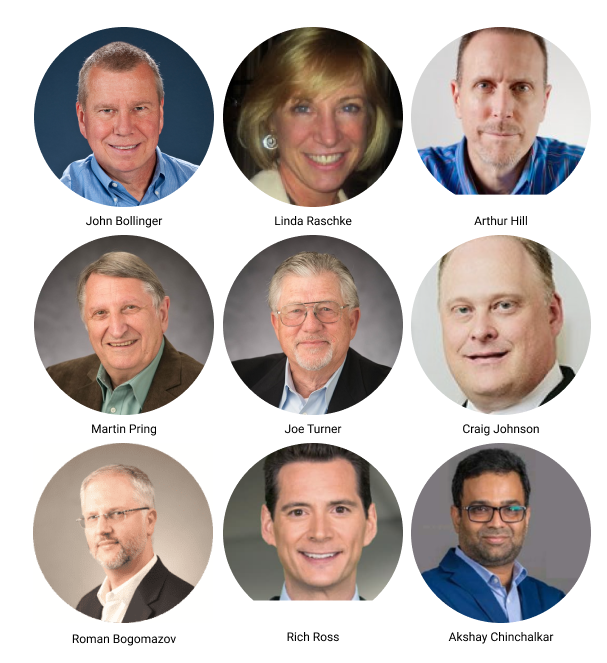
Speakers include:
- John Bollinger, CFA, CMT - Creator of Bollinger Bands
- Linda Raschke - Author of “Trading Sardines” with over 35 years of trading experience
- Arthur Hill, CMT - Chief Technical Strategist and main author at TrendInvestorPro.com
- Martin Pring - Founder of Pring Research and Chairman of Pring Turner Capital Group
- Joe Turner - Founding member of Pring Turner Capital Group, Past President of TSAA-SF
- Craig Johnson, CFA, CMT - Managing Director and Senior Technical Research Analyst at Piper Sandler Companies
- Roman Bogomazov - Leading Wyckoff Method educator, President of Wyckoff Associates, LLC (wyckoffanalytics.com), and Past President of the TSAA-SF
- Rich Ross, CMT - Managing Director and Head of Technical Analysis at Evercore ISI
- Akshay Chinchalkar, CMT - Workflow and electronic trading specialist at Bloomberg, Southeast Asia. CMT Association Board Member
Pricing:
Recent webinar - Alessio Rutigliano: Navigating the Crypto Market with the Wyckoff Method
Date: May 30, 2020 at 10 AM PST
Free for dues paying members (Become a member here)
Crypto assets are subject to the law of supply and demand, and move in cycles. The Wyckoff Method, along with intermarket and behavioral finance models, is an excellent tool to analyze this new asset class. The webinar will cover the basics of the Wyckoff Method and more advanced techniques applied to the universe of cryptocurrencies.
Alessio Rutigliano’s first encounter with the Wyckoff Method was Henry O. Pruden’s The Three Skills of Top Trading. He is a WTC (Wyckoff Trading Course) graduate and serves as a Teaching Assistant at Wyckoff Analytics. An avid student of intermarket analysis and behavioral finance models, his main focus is the development of sector rotation strategies in the Wild West of digital assets. He curates “Wyckoff in the World of Cryptocurrency”, a blog introducing Wyckoff analysis and trading tactics to low-liquidity speculative environments, including cryptos and emerging asset classes.
Recording for members here
Recent webinar - Ron William: Seeking Alpha in a VUCA World
Date: May 14, 2020 at 12 Noon PST
Free for dues paying members (Become a member here)
VUCA is a globally recognized acronym meaning Volatility, Uncertainty, Complexity & Ambiguity. This is a military term for mission critical decisions in the fog of war - unknown unknowns. The military battlefield is proving a useful metaphor for our financial market landscape. 2020 kicked off with a spike in Oil, Geopolitical risk premia, Brexit divorce & Virus alert. All this is amplified against the backdrop of late economic cycle, market fragility & socio-political unrest. Learn how to seek alpha in a VUCA world using a 3-step approach; Resilience, Divergent Thinking & Optionality.
Ron is a Market Strategist, with +20-years of experience, working for leading economic Research & Institutional firms; producing macro research and trading strategies. He specializes in blended, top-down, semi-discretionary analysis, driven by cycles and proprietary timing models. Ron is also a Behavioral Finance Expert, Trading Psychologist & Performance Coach. He uses latest techniques in behavioral/risk assessment modelling, peak-performance, neuro/body science and stress response management (SRM), including mindfulness & coherence training; supported by his market strategies.
Recording for members here
Announcing TSAA-SF Online Forums:
Open for all logged-in users to post and discuss topics. See the full page here!